How do I set the premissions for a MySQL user?

For security reasons it is important to restrict the permissions of the MySQL users. If a user is compromised all the databases and tables that the user has access to are exposed.

  1. Login to your cPanel account at https://dit-domæne.dk/cpanel

  2. Go to Databases > MySQL®-databaser
    MySQL Database Knap
  3. Scroll down to Add user to database and select a user to be added to the database
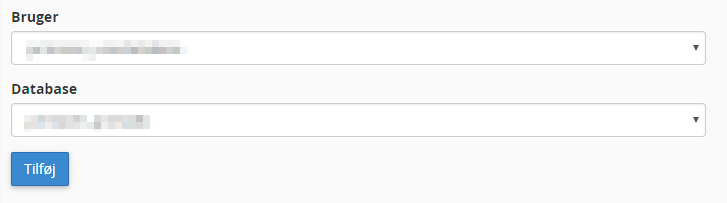
    MySQL Tilføj Bruger til Database

  4. Click on Add

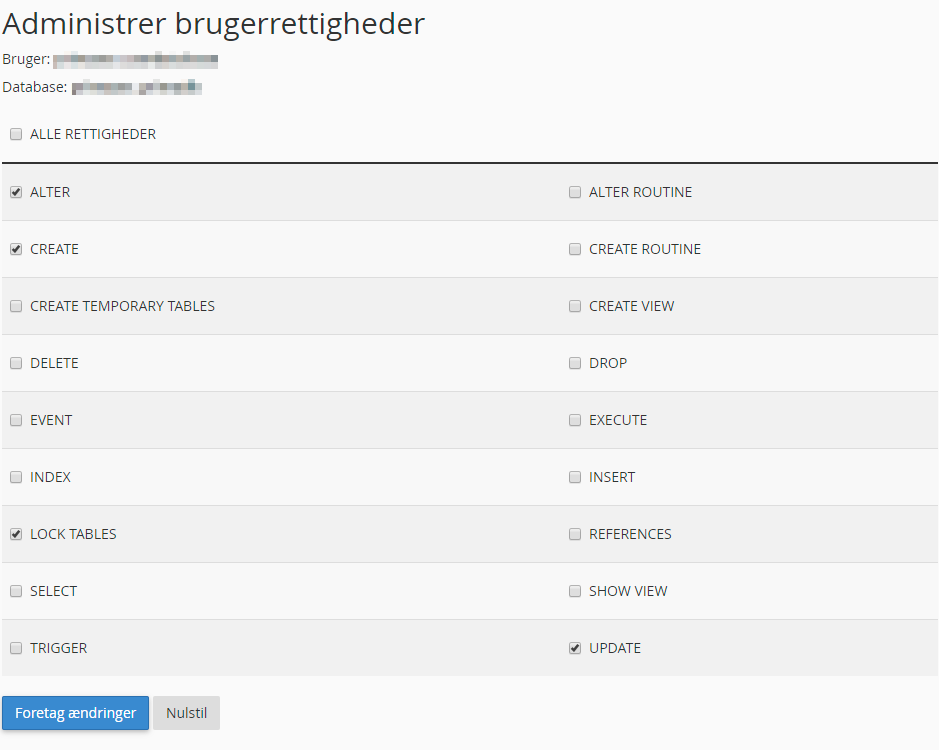
  5. Select the needed permissions
    MySQL Permissions
    Be careful about selecting unnecessary permissions. By default, WordPress only requires SELECT, INSERT, UPDATE, DELETE, CREATE og ALTER.

  6. Click on Makes Changes
  • 0 Users Found This Useful
Was this answer helpful?

Related Articles

How do I create a MySQL user?

Login to your cPanel account at https://your-domain.dk/cpanel Go to Databases >...

How do I create a MySQL database?

Login to your cPanel account at https://your-domain.dk/cpanel Go to Databases >...

How do I delete a MySQL user?

Login to your cPanel account at https://your-domain.dk/cpanel Go to Databases >...

How do I delete a MySQL database?

Log in to your cPanel account at https://your-domain.dk/cpanel Go to Databases >...

Why can't I access my MySQL database from my computer or another website?

For security reasons, it is only possible to connect to the MySQL server via local connections by...